
摘要:本文以真实业务场景为例,详细介绍如何用Spring AI Alibaba构建门店经营数据分析智能体,涵盖意图识别、工具编排、数据查询、分析建议生成、图表可视化全流程。适合需要在企业系统中落地AI能力的Java开发者。
前言:从想法到落地的真实历程
三个月前,公司运营部门提出了一个需求:门店经理每天要看各种报表,财务数据、客流统计、销售趋势,不同系统里的数据分散,查起来很麻烦。能不能做一个"对话式数据分析助手",让经理直接问"上个月北京门店的收入怎么样",系统自动查数据、分析、给出建议?
听起来挺简单,实际做起来发现坑不少。用户的问题五花八门,有的是查数据,有的是要对比,有的是问趋势。不同问题要调不同的接口,返回的数据格式也不一样。还要把这些数据整合起来,生成有意义的分析报告。
折腾了两个月,我们用Spring AI Alibaba把这个智能体落地了。这篇文章会把这个过程中的关键设计、代码实现、踩坑经验完整分享出来,希望能帮到有类似需求的团队。
源码仓库:https://github.com/Forevertxp/spring-ai-agent-demo
一、业务场景与技术挑战
1.1 需求拆解
门店经营数据分析智能体,要解决的核心问题是:
用户输入 → "查询北京门店2024年Q1的财务数据,分析一下表现如何"
期望输出 → 数据表格 + 趋势图表 + 分析建议 + 对比行业均值
拆解一下,智能体需要具备这些能力:
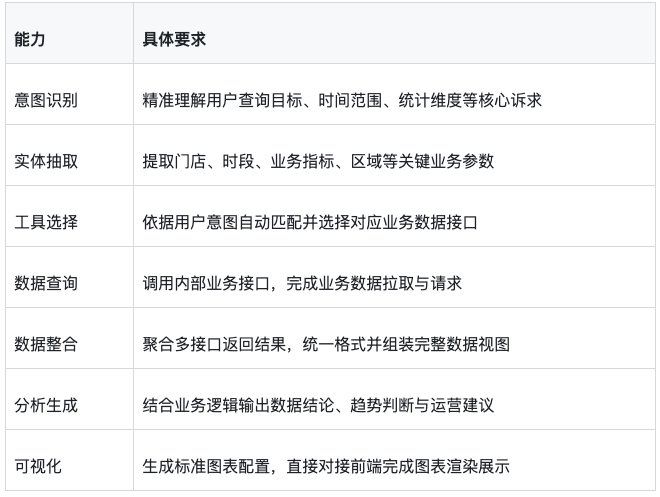
1.2 技术难点
实际开发中遇到的主要难点:
意图多样且模糊
用户不会按固定模板提问。同样是查财务数据,可能说"上个月收入"、"最近三个月销售额"、"第一季度营收",表述差异很大。单纯靠关键词匹配不行,需要模型真正理解语义。
数据来源分散
财务数据在SOS系统,客流数据在CRM系统,库存数据在WMS系统。不同系统的API格式、认证方式都不同。智能体要能适配多个数据源。
分析需要业务知识
给出有价值的分析建议,不能只罗列数据。比如"营收下降15%",要结合行业趋势、季节因素、竞争情况来解读。这需要注入业务知识,可以是知识库(RAG),也可以是预定义的分析模板。
输出形式要求高
运营部门要的是"可直接使用的报告",不是原始数据。需要表格、图表、文字分析组合输出。智能体要能生成结构化结果供前端展示。
二、智能体架构设计
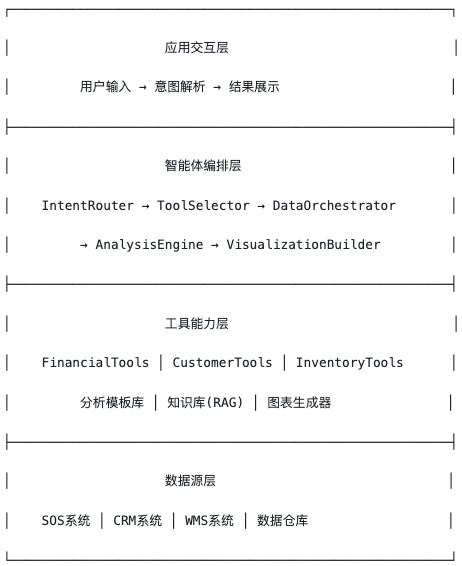
2.1 整体架构
在系统中,我们为大模型提供了多个专门的数据查询工具,用于高效获取各类业务数据,支撑大模型进行分析与决策。
2.2 核心组件职责
IntentRouter(意图路由器):用于识别用户意图类型:
- 数据查询(查具体数值)
- 对比分析(对比不同时段或门店)
- 趋势分析(分析变化趋势)
- 异常诊断(分析数据异常原因)
ToolSelector(工具选择器):根据意图选择要调用的工具组合:
- 查财务 → FinancialTools
- 查客流 → CustomerTools
- 查库存 → InventoryTools
- 综合分析 → 多工具组合
DataOrchestrator(数据编排器):协调多个工具的调用顺序、处理依赖关系。比如"对比本月和上月",需要先查本月,再查上月,然后对比。
AnalysisEngine(分析引擎):基于数据和业务知识生成分析结论。可以是大模型直接分析,也可以结合预定义的分析模板。
VisualizationBuilder(可视化构建器):生成图表配置(ECharts或其他图表库的JSON配置),供前端渲染。
2.3 Spring AI Alibaba的角色
在这个架构中,Spring AI Alibaba主要发挥作用的是:
- ChatClient:处理对话流程,管理多轮交互
- Function Call:实现工具调用,让模型能执行实际操作
- Advisor:注入业务知识(通过RAG),增强分析能力
- ChatMemory:记住上下文,支持追问和细化
核心思路是:让大模型做"大脑",负责理解意图、编排流程、生成分析;让工具做"手脚",负责实际的数据查询和操作。
三、意图识别与实体抽取
3.1 意图分类设计
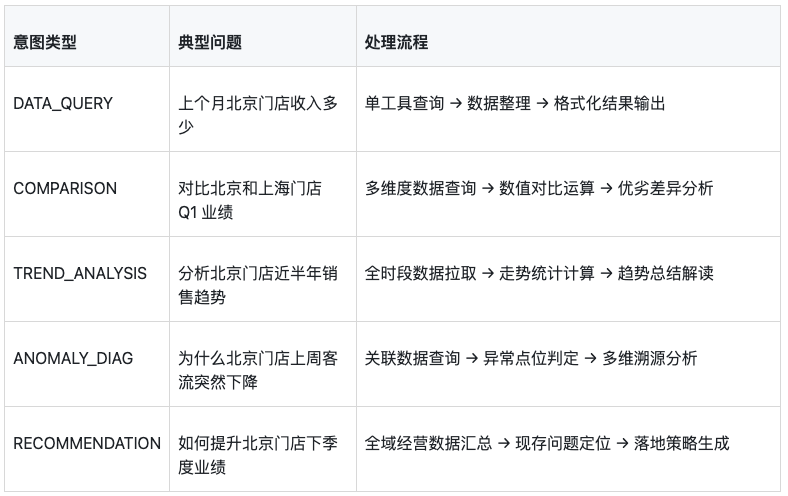
我们先定义了几种核心意图类型:
  public enum IntentType {
      DATA_QUERY,       // 数据查询:查具体数值
      COMPARISON,       // 对比分析:对比不同维度
      TREND_ANALYSIS,   // 趋势分析:分析变化趋势
      ANOMALY_DIAG,     // 异常诊断:分析异常原因
      RECOMMENDATION,   // 建议请求:寻求改进建议
      UNKNOWN;          // 无法识别

      @JsonValue
      public String toValue() {
          return name();
      }

      @JsonCreator
      public static IntentType fromValue(String value) {
          if (value == null) {
              return UNKNOWN;
          }
          String upperValue = value.toUpperCase().replace("-", "_");
          for (IntentType type : values()) {
              if (type.name().equals(upperValue)) {
                  return type;
              }
          }
          return UNKNOWN;
      }
  }
每种意图对应不同的处理流程:
3.2 实体定义
从用户问题中抽取的关键实体:
  public class QueryEntities {

      private List<String> storeNames;      // 门店名称列表
      private TimeRange timeRange;          // 时间范围
      private List<String> metrics;         // 指标类型:revenue, profit, customers, etc.
      private ComparisonDimension dimension; // 对比维度:store, time, product
      private AggregationType aggregation;   // 聚合方式:sum, avg, max, min

  }

  public class TimeRange {

      private String start;     // 开始时间
      private String end;       // 结束时间
      private TimeUnit unit;    // 时间单位:day, week, month, quarter, year

  }
3.3 意图识别实现
用Spring AI Alibaba的Function Call来实现意图识别:
  @Component
  public class IntentRecognitionTool {

      @Tool(description = "识别用户查询意图并抽取关键实体")
      public IntentResult recognizeIntent(@ToolParam(description = "用户原始问题") String userQuery) {

          // 这个工具实际上是让模型来识别意图
          // 我们通过精心设计的提示来引导模型输出结构化结果
          return null; // 实际由模型填充
      }
  }
关键不在工具本身,而是让模型在调用工具前先分析意图。我们在System Prompt中定义意图识别规则,同时系统提供兜底策略,以应对意图识别可能出现的失败。
  package com.hxy.agent.service;

  import com.fasterxml.jackson.databind.ObjectMapper;
  import com.hxy.agent.entity.IntentResult;
  import com.hxy.agent.entity.IntentType;
  import com.hxy.agent.entity.QueryEntities;
  import lombok.extern.slf4j.Slf4j;
  import org.springframework.stereotype.Service;

  import java.util.UUID;

  @Slf4j
  @Service
  public class IntentRouter {

      private final ObjectMapper objectMapper;
      private final DashScopeService dashScopeService;

      private static final String INTENT_SYSTEM_PROMPT = """
              你是一个意图识别专家。请分析用户的问题,识别用户意图并提取关键实体。

              意图类型说明:
              - DATA_QUERY: 数据查询,用户想查具体数值(如"北京店本月营收是多少")
              - COMPARISON: 对比分析,用户想对比不同维度(如"对比北京和上海店的营收")
              - TREND_ANALYSIS: 趋势分析,用户想看变化趋势(如"最近三个月客流趋势")
              - ANOMALY_DIAG: 异常诊断,用户想知道异常原因(如"为什么本月利润下降了")
              - RECOMMENDATION: 建议请求,用户想获得改进建议(如"如何提升客流")
              - UNKNOWN: 无法识别的意图

              请以JSON格式返回结果,格式如下:
              {"intent":"意图类型","confidence":0.0-1.0,"entities":{"storeNames":["门店名称"],"timeRange":{"start":"开始时间","end":"结束时间","unit":"DAY/MONTH/YEAR"},"metrics":["指标名称"],"dimension":"维度","aggregation":"聚合方式"}}

              注意:
              1. 只返回JSON,不要有其他内容
              2. confidence表示置信度,0-1之间
              3. 如果无法提取某个实体,该字段可以为null或空数组
              4. storeNames应提取中文门店名称
              5. metrics可能包括:营收、利润、客流、库存等
              """;

      public IntentRouter(ObjectMapper objectMapper, DashScopeService dashScopeService) {
          this.objectMapper = objectMapper;
          this.dashScopeService = dashScopeService;
      }

      public IntentResult analyzeIntent(String userQuery) {
          log.info("分析意图: {}", userQuery);

          try {
              String sessionId = "intent-" + UUID.randomUUID().toString().substring(0, 8);
              String response = dashScopeService.chat(sessionId, INTENT_SYSTEM_PROMPT, userQuery);
              log.info("LLM原始响应: {}", response);

              String jsonContent = extractJson(response);
              log.info("提取的JSON: {}", jsonContent);

              IntentResult result = parseIntentResult(jsonContent);
              log.info("意图识别结果: intent={}, confidence={}", result.getIntent(), result.getConfidence());
              return result;

          } catch (Exception e) {
              log.error("LLM意图识别失败,使用关键词兜底", e);
              return fallbackIntentRecognition(userQuery);
          }
      }

      private String extractJson(String response) {
          int start = response.indexOf('{');
          int end = response.lastIndexOf('}');
          if (start >= 0 && end > start) {
              return response.substring(start, end + 1);
          }
          return response;
      }

      private IntentResult parseIntentResult(String json) {
          try {
              return objectMapper.readValue(json, IntentResult.class);
          } catch (Exception e) {
              log.warn("解析LLM返回JSON失败: {}", e.getMessage());
              return IntentResult.unknown();
          }
      }

      private IntentResult fallbackIntentRecognition(String userQuery) {
          String query = userQuery.toLowerCase();

          IntentResult result = IntentResult.builder()
                  .entities(QueryEntities.builder().build())
                  .confidence(0.6)
                  .build();

          if (query.contains("对比") || query.contains("比较") || query.contains("差异") || query.contains("哪个更好")) {
              result.setIntent(IntentType.COMPARISON);
          } else if (query.contains("趋势") || query.contains("变化") || query.contains("走势") || query.contains("增长") || query.contains("下降")) {
              result.setIntent(IntentType.TREND_ANALYSIS);
          } else if (query.contains("为什么") || query.contains("原因") || query.contains("怎么回事") || query.contains("异常")) {
              result.setIntent(IntentType.ANOMALY_DIAG);
          } else if (query.contains("建议") || query.contains("如何提升") || query.contains("怎么办") || query.contains("改进")) {
              result.setIntent(IntentType.RECOMMENDATION);
          } else {
              result.setIntent(IntentType.DATA_QUERY);
              result.setConfidence(0.4);
          }

          return result;
      }
  }
3.4 时间解析的坑
用户说"上个月"、"最近三个月"、"第一季度",这些相对时间需要解析成具体日期。我们单独做了个时间解析工具:
package com.hxy.agent.tool;

import com.hxy.agent.entity.TimeRange;
import com.hxy.agent.entity.TimeUnit;
import lombok.extern.slf4j.Slf4j;
import org.springframework.stereotype.Component;

import java.time.LocalDate;
import java.util.regex.Matcher;
import java.util.regex.Pattern;

@Slf4j
@Component
public class TimeParserTool {

    public TimeRange parseTime(String timeExpression) {
        LocalDate today = LocalDate.now();
        log.info("解析时间表达式: {}", timeExpression);

        if (timeExpression.contains("本月")) {
            return new TimeRange(
                    today.withDayOfMonth(1).toString(),
                    today.toString(),
                    TimeUnit.MONTH
            );
        }

        if (timeExpression.contains("上个月") || timeExpression.contains("上月")) {
            LocalDate lastMonthStart = today.minusMonths(1).withDayOfMonth(1);
            LocalDate lastMonthEnd = today.withDayOfMonth(1).minusDays(1);
            return new TimeRange(
                    lastMonthStart.toString(),
                    lastMonthEnd.toString(),
                    TimeUnit.MONTH
            );
        }

        if (timeExpression.contains("最近") || timeExpression.contains("近")) {
            Pattern pattern = Pattern.compile("(最近|近)(\\d+)个?(月|周|天)");
            Matcher matcher = pattern.matcher(timeExpression);
            if (matcher.find()) {
                int count = Integer.parseInt(matcher.group(2));
                String unitStr = matcher.group(3);

                if (unitStr.equals("月")) {
                    LocalDate start = today.minusMonths(count);
                    return new TimeRange(start.toString(), today.toString(), TimeUnit.MONTH);
                } else if (unitStr.equals("周")) {
                    LocalDate start = today.minusWeeks(count);
                    return new TimeRange(start.toString(), today.toString(), TimeUnit.WEEK);
                } else if (unitStr.equals("天")) {
                    LocalDate start = today.minusDays(count);
                    return new TimeRange(start.toString(), today.toString(), TimeUnit.DAY);
                }
            }
        }

        if (timeExpression.contains("季度") || timeExpression.contains("Q")) {
            return parseQuarter(timeExpression, today);
        }

        if (timeExpression.contains("今年")) {
            return new TimeRange(
                    today.withDayOfYear(1).toString(),
                    today.toString(),
                    TimeUnit.YEAR
            );
        }

        if (timeExpression.contains("去年")) {
            LocalDate lastYearStart = today.minusYears(1).withDayOfYear(1);
            LocalDate lastYearEnd = today.withDayOfYear(1).minusDays(1);
            return new TimeRange(
                    lastYearStart.toString(),
                    lastYearEnd.toString(),
                    TimeUnit.YEAR
            );
        }

        if (timeExpression.contains("本周")) {
            LocalDate weekStart = today.minusDays(today.getDayOfWeek().getValue() - 1);
            return new TimeRange(weekStart.toString(), today.toString(), TimeUnit.WEEK);
        }

        if (timeExpression.contains("上周")) {
            LocalDate lastWeekStart = today.minusWeeks(1).minusDays(today.getDayOfWeek().getValue() - 1);
            LocalDate lastWeekEnd = lastWeekStart.plusDays(6);
            return new TimeRange(lastWeekStart.toString(), lastWeekEnd.toString(), TimeUnit.WEEK);
        }

        return TimeRange.unknown();
    }

    private TimeRange parseQuarter(String expression, LocalDate today) {
        int year = today.getYear();
        int quarter = 1;

        Pattern qPattern = Pattern.compile("Q(\\d)|第(\\d)季度");
        Matcher matcher = qPattern.matcher(expression);
        if (matcher.find()) {
            quarter = Integer.parseInt(matcher.group(1) != null ? matcher.group(1) : matcher.group(2));
        }

        if (expression.contains("今年")) {
            year = today.getYear();
        } else if (expression.contains("去年")) {
            year = today.getYear() - 1;
        } else if (expression.contains("上季度") || expression.contains("上个季度")) {
            quarter = (today.getMonthValue() - 1) / 3 + 1;
            if (quarter == 1) {
                quarter = 4;
                year = year - 1;
            } else {
                quarter = quarter - 1;
            }
        }

        LocalDate start = LocalDate.of(year, (quarter - 1) * 3 + 1, 1);
        LocalDate end = start.plusMonths(3).minusDays(1);

        return new TimeRange(start.toString(), end.toString(), TimeUnit.QUARTER);
    }

    public String getDescription() {
        return """
                时间解析工具,将相对时间转换为具体日期:
                - 支持: 本月、上个月、最近N个月、Q1/第一季度、今年、去年、本周、上周

                示例:
                - "上个月" → 2026-04-01 到 2026-04-30
                - "最近三个月" → 2026-02-16 到 2026-05-16
                - "Q1" → 2026-01-01 到 2026-03-31
                """;
    }
}
实际使用中,时间解析是最容易出错的地方。用户说的"上季度"可能是上个自然季度,也可能是从当前业务周期推算的季度,需要根据业务定义明确规则。
四、工具定义与实现
4.1 数据查询工具
在系统中,我们为大模型提供了多个专门的数据查询工具,用于高效获取各类业务数据,支撑大模型进行分析与决策。如:
财务数据工具:
    package com.hxy.agent.tool;

    import com.hxy.agent.model.FinancialData;
    import com.hxy.agent.service.MockDataService;
    import lombok.extern.slf4j.Slf4j;
    import org.springframework.stereotype.Component;

    import java.util.Arrays;
    import java.util.List;

    @Slf4j
    @Component
    public class FinancialDataTool {

        private final MockDataService mockDataService;

        public FinancialDataTool(MockDataService mockDataService) {
            this.mockDataService = mockDataService;
        }

        public FinancialData getFinancialData(String storeCode, String startDate, String endDate, String metric) {
            log.info("财务数据查询: store={}, range={}, metric={}", storeCode, startDate + "-" + endDate, metric);
            return mockDataService.generateFinancialData(storeCode, startDate, endDate);
        }

        public List<FinancialData> getMultiStoreFinancial(String storeCodes, String startDate, String endDate, String metric) {
            String[] codes = storeCodes.split(",");
            return Arrays.stream(codes)
                    .map(code -> getFinancialData(code.trim(), startDate, endDate, metric))
                    .toList();
        }

        public List<FinancialData> getFinancialTrend(String storeCode, String startDate, String endDate, String metric) {
            log.info("财务趋势查询: store={}, range={}", storeCode, startDate + "-" + endDate);
            return mockDataService.generateFinancialTrend(storeCode, startDate, endDate);
        }

        public String getDescription() {
            return """
                    财务数据工具,用于查询门店财务数据:
                    - getFinancialData(storeCode, startDate, endDate, metric): 查询单个门店财务数据
                    - getMultiStoreFinancial(storeCodes, startDate, endDate, metric): 查询多个门店财务数据
                    - getFinancialTrend(storeCode, startDate, endDate, metric): 查询财务趋势数据

                    参数说明:
                    - storeCode: 门店编码(BJ001/SH001/GZ001/SZ001)
                    - startDate: 开始日期(yyyy-MM-dd)
                    - endDate: 结束日期(yyyy-MM-dd)
                    - metric: 指标类型(revenue/profit/cost/margin)
                    """;
        }
    }
库存数据工具:
  package com.hxy.agent.tool;

  import com.hxy.agent.model.InventoryStatus;
  import com.hxy.agent.service.MockDataService;
  import lombok.extern.slf4j.Slf4j;
  import org.springframework.stereotype.Component;

  @Slf4j
  @Component
  public class InventoryTool {

      private final MockDataService mockDataService;

      public InventoryTool(MockDataService mockDataService) {
          this.mockDataService = mockDataService;
      }

      public InventoryStatus getInventoryStatus(String storeCode) {
          log.info("库存状态查询: store={}", storeCode);
          return mockDataService.generateInventoryStatus(storeCode);
      }

      public InventoryStatus getInventoryTurnover(String storeCode, int months) {
          return getInventoryStatus(storeCode);
      }

      public InventoryStatus getStockAlerts(String storeCode) {
          return getInventoryStatus(storeCode);
      }

      public String getDescription() {
          return """
                  库存数据工具,用于查询门店库存状态:
                  - getInventoryStatus(storeCode): 查询库存状态
                  - getInventoryTurnover(storeCode, months): 查询库存周转率

                  参数说明:
                  - storeCode: 门店编码
                  - months: 时间范围月数
                  """;
      }
  }
4.2 工具设计原则
在实际开发中,我们总结了几条工具设计原则:
单一职责
每个工具只做一件事。不要设计"万能查询"工具,让模型自己去判断要查什么。拆细一点,模型更容易正确选择。比如我们最开始设计了一queryData(type, params)的万能工具,结果模型经常传错参数类型。拆getFinancialDatagetCustomerFlowgetInventoryStatus后,调用准确率大幅提升。
参数清晰
每个参数都要有明确的描述,让模型知道应该传什么值。时间格式、门店编码规则、指标类型枚举,都要在描述中说明。
返回结构化
工具返回的数据要结构化,便于后续处理和分析生成。不要返回原始的API响应字符串,要转换成有明确字段的Java对象。
错误处理
工具内部要做好错误处理,不要让异常直接抛给模型。遇到查询失败,返回包含错误信息的结果对象,让模型知道发生了什么。
  @Data
  @Builder
  @NoArgsConstructor
  @AllArgsConstructor
  public class FinancialData {
      private String storeCode;
      private String storeName;
      private String timeRange;
      private double revenue;
      private double profit;
      private double cost;
      private double profitMargin;
      private boolean success;
      private String errorMessage;

      public static FinancialData error(String message) {
          return FinancialData.builder()
                  .success(false)
                  .errorMessage(message)
                  .build();
      }
  }
五、智能体编排实现
5.1 主智能体设计
核心是设计一个能自主编排流程的智能体:
  public Flux<String> analyzeStream(String sessionId, String userQuery) {
        log.info("流式分析请求: sessionId={}, query={}", sessionId, userQuery);

        // 1. 意图识别
        IntentResult intent = intentRouter.analyzeIntent(userQuery);
        log.info("意图识别: {}", intent.getIntent());

        // 保存意图结果
        sessionIntentResults.put(sessionId, intent);

        // 2. 决定工具调用
        List<ToolCallRequest> toolCalls = determineToolCalls(sessionId, userQuery, intent);
        log.info("工具调用: {}个", toolCalls.size());

        // 3. 执行工具
        List<ToolCallResult> toolResults = new ArrayList<>();
        for (ToolCallRequest request : toolCalls) {
            ToolCallResult result = toolRegistry.executeTool(request);
            toolResults.add(result);
        }

        // 保存工具结果到session
        sessionToolResults.put(sessionId, toolResults);
        log.info("工具执行完成: 成功{}个", toolResults.stream().filter(ToolCallResult::isSuccess).count());

        // 4. 获取完整分析结果
        String fullAnalysis = generateFinalAnalysis(sessionId, userQuery, toolResults);

        // 5. 将完整结果按段落分块返回(模拟流式效果)
        return splitIntoChunks(fullAnalysis);
    }


  private List<ToolCallRequest> determineToolCalls(String sessionId, String userQuery, IntentResult intent) {
        // 构建工具决策提示
        String decisionPrompt = buildToolDecisionPrompt(userQuery, intent);

        // 调用AI决定工具
        String aiResponse = callDashScopeForToolDecision(decisionPrompt);
        log.info("AI工具决策响应: {}", aiResponse);

        // 解析工具调用请求
        return parseToolCallsFromResponse(aiResponse, userQuery, intent);
    }

  private String callDashScopeForToolDecision(String prompt) {
        try {
            List<Message> messages = new ArrayList<>();
            messages.add(Message.builder().role("system").content("""
                    你是数据分析智能体的工具决策模块。
                    你的任务是分析用户问题,决定需要调用哪些数据查询工具。
                    请严格按照JSON格式输出,不要添加任何额外文字。
                    """).build());
            messages.add(Message.builder().role("user").content(prompt).build());

            GenerationParam param = GenerationParam.builder()
                    .model(model)
                    .apiKey(apiKey)
                    .messages(messages)
                    .temperature(0.1f)  // 降低温度以提高决策准确性
                    .build();

            GenerationResult result = generation.call(param);

            if (result != null && result.getOutput() != null) {
                return result.getOutput().getText();
            }

            return "[]";

        } catch (Exception e) {
            log.error("工具决策调用失败: {}", e.getMessage());
            return "[]";
        }
    }

  private String callDashScopeForAnalysis(String sessionId, String prompt, IntentResult intent) {
        try {
            List<Message> messages = sessionMessages.computeIfAbsent(sessionId, k -> new ArrayList<>());

            if (messages.isEmpty()) {
                // 根据意图构建更专业的系统提示
                String systemPrompt = buildSystemPromptByIntent(intent);
                messages.add(Message.builder().role("system").content(systemPrompt).build());
            }

            messages.add(Message.builder().role("user").content(prompt).build());

            GenerationParam param = GenerationParam.builder()
                    .model(model)
                    .apiKey(apiKey)
                    .messages(messages)
                    .temperature(0.7f)
                    .build();

            GenerationResult result = generation.call(param);

            if (result != null && result.getOutput() != null &&
                result.getOutput().getChoices() != null &&
                !result.getOutput().getChoices().isEmpty()) {

                String response = result.getOutput().getChoices().get(0).getMessage().getContent();
                messages.add(Message.builder().role("assistant").content(response).build());

                return response;
            }

            return buildFallbackAnalysis(sessionToolResults.getOrDefault(sessionId, new ArrayList<>()), intent);

        } catch (Exception e) {
            log.error("分析调用失败: {}", e.getMessage());
            return buildFallbackAnalysis(sessionToolResults.getOrDefault(sessionId, new ArrayList<>()), intent);
        }
    }
5.2 分析模板库
有些常见分析场景,可以用模板来增强输出质量:
  @Service
  public class AnalysisTemplateLibrary {

      @Getter
      private final Map<String, AnalysisTemplate> templates;

      public AnalysisTemplateLibrary() {
          templates = new HashMap<>();
          initTemplates();
      }

      private void initTemplates() {
          templates.put("financial_health", AnalysisTemplate.builder()
                  .name("门店财务健康度评估")
                  .sections(Arrays.asList(
                          "营收分析:对比历史数据和同类门店",
                          "利润分析:毛利率变化和成本构成",
                          "现金流分析:资金周转效率",
                          "风险提示:异常指标和潜在问题",
                          "改进建议:基于数据的行动方案"
                  ))
                  .metricsToQuery(Arrays.asList("revenue", "profit", "cost", "margin"))
                  .comparisons(Arrays.asList("last_period", "same_store_avg", "industry_avg"))
                  .build());

          templates.put("customer_flow", AnalysisTemplate.builder()
                  .name("门店客流分析")
                  .sections(Arrays.asList(
                          "客流总量:时段分布和峰值分析",
                          "转化分析:客流到成交的转化率",
                          "客户结构:新老客户占比",
                          "异常诊断:客流波动原因",
                          "优化建议:提升客流的策略"
                  ))
                  .metricsToQuery(Arrays.asList("total_flow", "hourly_flow", "conversion_rate"))
                  .build());

          templates.put("comprehensive", AnalysisTemplate.builder()
                  .name("门店综合运营分析")
                  .sections(Arrays.asList(
                          "财务表现:营收、利润、成本",
                          "客流情况:客流量、转化率",
                          "库存状态:周转率、缺货情况",
                          "综合评分:基于KPI的健康度评分",
                          "优先行动:最需要关注的问题和建议"
                  ))
                  .metricsToQuery(Arrays.asList("revenue", "profit", "flow", "inventory"))
                  .build());
      }

      public AnalysisTemplate getTemplate(String templateName) {
          return templates.get(templateName);
      }

      public String getTemplatePrompt(String templateName) {
          AnalysisTemplate template = templates.get(templateName);
          if (template == null) return "";

          return """
                  请按照以下结构进行分析:
                  %s

                  需要查询的指标:%s
                  需要对比的维度:%s

                  请确保每个部分都有具体数据支撑,并给出分析结论。
                  """.formatted(
                  template.getSections().stream()
                          .map(s -> "- " + s)
                          .reduce("", (a, b) -> a + "\n" + b),
                  template.getMetricsToQuery().toString(),
                  template.getComparisons() != null ? template.getComparisons().toString() : "无"
          );
      }

      @Getter
      public static class AnalysisTemplate {
          private String name;
          private List<String> sections;
          private List<String> metricsToQuery;
          private List<String> comparisons;

          public static AnalysisTemplate builder() {
              return new AnalysisTemplate();
          }

          public AnalysisTemplate name(String name) {
              this.name = name;
              return this;
          }

          public AnalysisTemplate sections(List<String> sections) {
              this.sections = sections;
              return this;
          }

          public AnalysisTemplate metricsToQuery(List<String> metricsToQuery) {
              this.metricsToQuery = metricsToQuery;
              return this;
          }

          public AnalysisTemplate comparisons(List<String> comparisons) {
              this.comparisons = comparisons;
              return this;
          }

          public AnalysisTemplate build() {
              return this;
          }
      }
  }
5.3 业务知识库
分析建议的质量,很大程度上依赖于业务知识的注入。我们用RAG来增强:
知识库内容:
- 行业基准数据(同类门店的平均营收、利润率等)
- 季节性规律(旺季淡季的收入变化规律)
- 异常诊断案例(历史上数据异常的原因分析)
- 改进措施库(针对各类问题的优化策略)
知识库构建:
  @Service
  public class KnowledgeBaseService {

      private final VectorStore vectorStore;
      private final EmbeddingModel embeddingModel;

      public void initializeKnowledgeBase() {

          // 加载行业基准数据
          loadIndustryBenchmarks();
          // 加载历史案例
          loadHistoricalCases();
          // 加载业务规则
          loadBusinessRules();
      }

      private void loadIndustryBenchmarks() {

          List<Document> benchmarks = Arrays.asList(

              new Document("""

                  门店财务健康度基准(同类门店平均值):
                  - 月营收:一线城市50-80万,二线城市30-50万
                  - 利润率:餐饮行业15-20%,零售行业10-15%
                  - 库存周转率:零售行业4-6次/年
                  - 客流转化率:线下门店20-30%
                  如果门店指标低于基准值20%以上,需要重点关注。
                  """, Map.of("type", "benchmark", "category", "financial")),
              new Document("""
                  季节性波动规律:
                  - 餐饮门店:节假日客流增加30-50%,夏季为淡季(下降15-20%)
                  - 服装零售:换季期为高峰,1-2月和7-8月为淡季
                  - 商场整体:周末客流比工作日高40-60%
                  分析趋势时要考虑季节因素,避免误判。
                  """, Map.of("type", "benchmark", "category", "seasonality"))
          );
          vectorStore.add(benchmarks);
      }

      private void loadHistoricalCases() {

          List<Document> cases = Arrays.asList(

              new Document("""
                  客流突然下降案例分析:
                  案例1:某门店周一客流骤降40%
                  原因:周边道路施工导致交通不便
                  解决:调整营业时间,增加外卖渠道
                  案例2:某门店周末客流持续下降
                  原因:竞争对手新店开业分流
                  解决:推出差异化活动,加强会员运营
                  案例3:某门店全时段客流下降
                  原因:商品结构老化,吸引力下降
                  解决:引进新品类,优化商品陈列
                  """, Map.of("type", "case", "category", "anomaly")),
          );
          vectorStore.add(cases);
      }

      public VectorStore getVectorStore() {
          return vectorStore;
      }
  }
通过QuestionAnswerAdvisor,智能体在分析时会自动检索相关的业务知识,融入到分析中。
六、完整案例分析
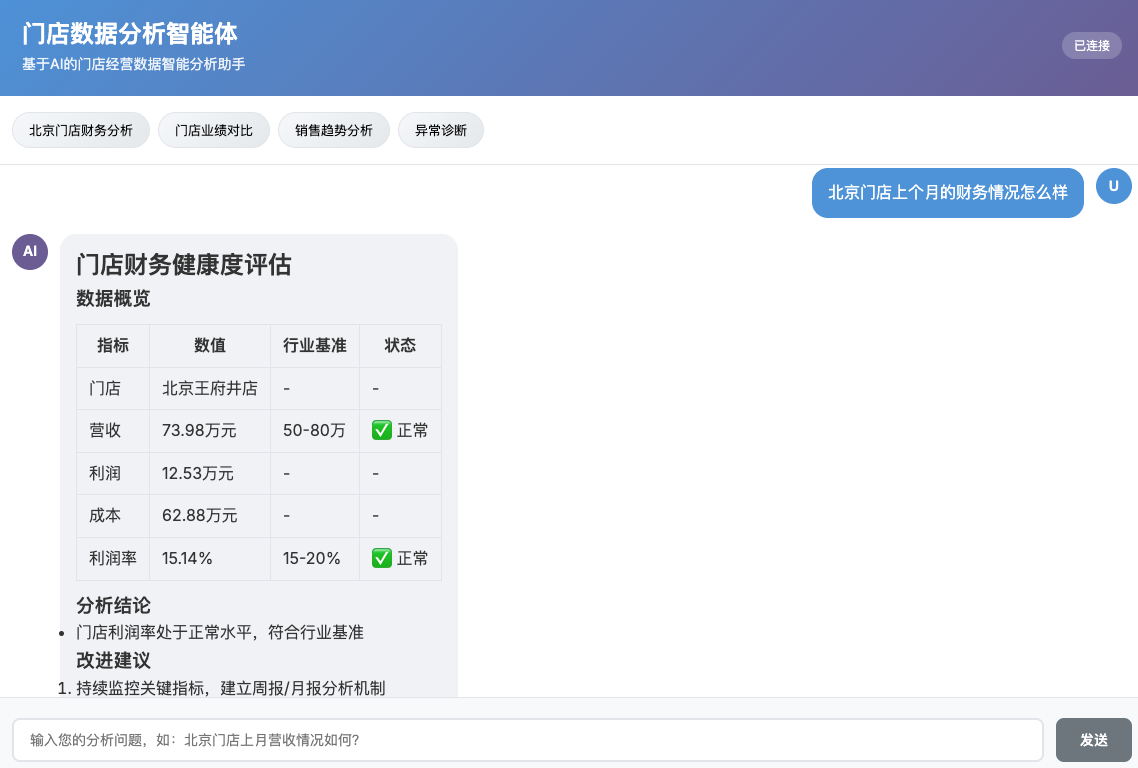
以一个具体案例来说明整个流程:用户问"北京门店上个月的财务情况怎么样,帮我分析一下"。
6.1 意图识别阶段
智能体首先分析意图:
  {

      "intent": "DATA_QUERY",
      "entities": {
          "stores": ["北京门店"],
          "timeRange": {
              "start": "2024-10-01",
              "end": "2024-10-31"
          },
          "metrics": ["revenue", "profit", "cost", "margin"]
      },
      "confidence": 0.92
  }
6.2 数据查询阶段
智能体调用工具:
  // 模型决定调用的工具序列
  getFinancialData("BJ001", "2024-10-01", "2024-10-31", "revenue")
  getFinancialData("BJ001", "2024-10-01", "2024-10-31", "profit")
  getFinancialData("BJ001", "2024-10-01", "2024-10-31", "cost")

  // 获取上月数据用于对比
  getFinancialData("BJ001", "2024-09-01", "2024-09-30", "revenue")
工具返回的数据:
  {
      "storeCode": "BJ001",
      "storeName": "北京王府井店",
      "timeRange": "2024-10",
      "revenue": 650000,
      "profit": 120000,
      "cost": 530000,
      "profitMargin": 18.5,
      "success": true
  }
6.3 知识库检索阶段
智能体自动检索相关知识:
- 行业基准数据(同类门店平均利润率15-20%)
- 季节性规律(10月为正常月份,无明显季节因素)
- 异常诊断案例(无匹配案例)
6.4 分析生成阶段
智能体整合数据后生成分析:
七、踩坑经验与优化
7.1 工具调用准确性
问题:模型有时候会调用错误的工具,或者传递错误的参数。
原因分析:
- 工具描述不够清晰
- 参数格式没有明确说明
- 工具太多,模型难以选择
解决方案:
1. 精简工具数量,合并相似工具
2. 详细描述参数格式和要求
3. 在System Prompt中给出工具使用指南
  .defaultSystem("""
      ...
      工具使用指南:
      1. 查询财务数据:使用getFinancialData,参数:门店编码、开始日期、结束日期、指标类型
      2. 查询客流数据:使用getCustomerFlow,参数:门店编码、开始日期、结束日期
      3. 查询库存数据:使用getInventoryStatus,参数:门店编码
      时间格式必须是yyyy-MM-dd,如"2024-10-01"
      门店编码格式:北京门店=BJ001,上海门店=SH001,广州门店=GZ001
      指标类型:revenue/profit/cost/margin/customers/flow
      如果用户没有明确时间,请推断并使用合理的时间范围。
      """)
7.2 数据整合问题
问题:多个工具返回的数据格式不一致,整合时出错。
解决方案:设计统一的数据包装类:
  @Data
  public class UnifiedStoreData {

      private String storeCode;

      private String storeName;

      private TimeRange timeRange;

      // 财务数据
      private FinancialSection financial;

      // 客流数据
      private CustomerSection customer;

      // 库存数据
      private InventorySection inventory;

      // 标记哪些数据已查询
      private Set<String> queriedSections;

  }

  public class FinancialSection {

      private double revenue;

      private double profit;

      private double cost;

      private double profitMargin;

      private List<DailyData> dailyBreakdown;

  }
工具返回后,统一包装成这个结构,后续分析时从统一结构取数据。
7.3 分析质量提升
问题:模型给出的分析太泛,缺乏深度。
原因:模型缺少业务上下文和分析方法指导。
解决方案:
1. 通过RAG注入业务知识(行业基准、历史案例)
2. 使用分析模板引导结构化输出
3. 在Prompt中给出分析方法指导
  .defaultSystem("""
      ...
      分析方法论:
      1. 对比分析:必须有参照对象(历史数据、同类门店、行业基准)
      2. 异常诊断:数据异常时,分析可能原因(季节因素、竞争环境、内部问题)
      3. 根因分析:发现问题后,深入分析根本原因
      4. 建议原则:建议要具体、可操作、有优先级
      不要泛泛而谈,如"需要提升营收",要给出具体方法如"优化周末促销活动,提升客单价10%"。
      """)
7.4 性能优化
问题:复杂分析需要调用多个工具,响应时间长。
解决方案:
1. 并行调用无依赖的工具
  // 改造工具支持批量调用
  @Tool(description = "批量查询门店综合数据")
  public UnifiedStoreData getStoreSummary(
      @ToolParam(description = "门店编码") String storeCode,
      @ToolParam(description = "开始日期") String startDate,
      @ToolParam(description = "结束日期") String endDate
  ) {

      // 内部并行调用多个API
      CompletableFuture<FinancialData> financialFuture =
          CompletableFuture.supplyAsync(() -> erpApiClient.queryFinancial(...));

      CompletableFuture<CustomerFlowData> customerFuture =
          CompletableFuture.supplyAsync(() -> crmApiClient.queryCustomerFlow(...));

      CompletableFuture<InventoryStatus> inventoryFuture =
          CompletableFuture.supplyAsync(() -> wmsApiClient.queryInventory(...));

      // 等待所有结果

      CompletableFuture.allOf(financialFuture, customerFuture, inventoryFuture).join();

      return UnifiedStoreData.builder()
          .financial(financialFuture.get())
          .customer(customerFuture.get())
          .inventory(inventoryFuture.get())
          .build();
  }
2. 缓存常用数据
门店基本信息、历史基准数据等,可以缓存减少重复查询。
3. 流式输出
先输出分析框架和初步结论,边分析边展示,提升用户体验。
八、总结
门店经营数据分析智能体的开发,核心挑战不在技术实现,而在理解业务、设计合理的流程。
Spring AI Alibaba提供了强大的基础能力:意图理解、工具调用、知识库集成。但如何定义工具、如何组织数据、如何引导分析,需要根据具体业务场景来设计。
我们在这个过程中学到几点:
工具设计要细而精:不要设计万能工具,要拆分成单一职责的小工具。描述要清晰,参数要明确。
业务知识是关键:没有业务知识,模型只能罗列数据。通过RAG注入行业基准、历史案例,才能生成有价值的分析。
流程编排要合理:意图识别 → 工具选择 → 数据查询 → 数据整合 → 分析生成,每个环节都要有明确的职责和输出。
持续迭代优化:上线后持续收集用户反馈,优化工具描述、调整Prompt、扩充知识库,效果会越来越好。
如果你也在构建类似的智能体,希望这篇文章能提供一些参考。
---
参考资料:
- [Spring AI Alibaba官方文档](https://java2ai.com)
- [阿里云DashScope API文档](https://help.aliyun.com/zh/dashscope/)
- [Spring AI官方文档](https://docs.spring.io/spring-ai/reference/)
- [ECharts图表配置文档](https://echarts.apache.org/zh/option.html)